
Supervising an AI Engineer: Lessons from 212 Sessions
What actually works when AI is your only engineer — data, patterns, and the system behind “ultrathink.”

The Moment Everything Broke
Seventeen failed attempts on the same feature. Different fixes. Same bug. Same confident “should work” every round.
That’s when it clicked: the issue wasn’t the model — it was the process.
Polite requests produced surface patches. Structured pressure produced an analysis.
So I changed the rules: no implementation without TODOs, specs, and proof. No “should work.” Only “will work.”
The Experiment
Two months ago, I set a simple constraint: build a production SaaS platform without writing a single line of code myself.
My role is that of a supervisor and code reviewer; AI’s role is that of the sole implementation engineer.
The goal wasn’t to prove that AI can replace developers (it can’t). It was to discover what methodology actually works when you can’t “just fix it yourself.”
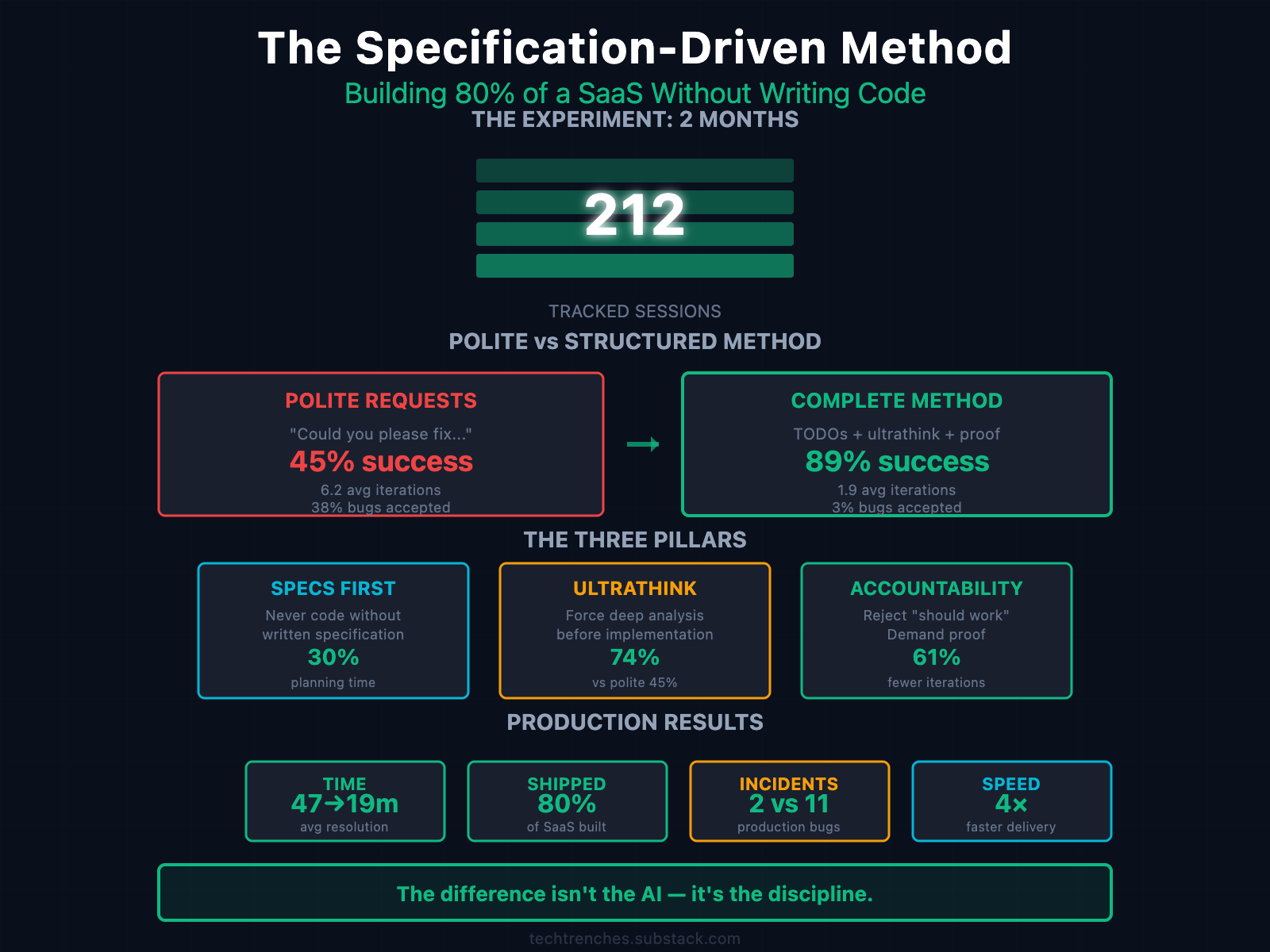
Over eight weeks, I tracked 212 sessions across real features — auth, billing, file processing, multi-tenancy, and AI integrations. Every prompt, failure, and revision is logged in a spreadsheet.
The Numbers
80% of the application shipped without manual implementation
89% success rate on complex features
61% fewer iterations per task
4× faster median delivery
2 production incidents vs 11 using standard prompting
The experiment wasn’t about proving AI’s power — it was about what happens when you remove human intuition from the loop. The system that emerged wasn’t designed — it was forced by failure.
The Specification-First Discovery
The most critical pattern: never start implementation without a written specification.
Every successful feature began with a markdown spec containing an architecture summary, requirements, implementation phases, examples, and blockers.
Then I opened that file and said:
“Plan based on this open file. ultrathink.”
Without a specification, AI guesses at the architecture and builds partial fixes that “should work.” With a spec, it has context, constraints, and a definition of done.
Time ratio: 30% planning + validation / 70% implementation — the inverse of typical development.
The Specification Cycle
1 Draft: “Create implementation plan for [feature]. ultrathink.” → Review assumptions and missing pieces.
2 Refine: “You missed [X, Y, Z]. Check existing integrations.” → Add context.
3 Validate: “Compare with [existing-feature.md].” → Ensure consistency.
4 Finalize: “Add concrete code examples for each phase.”
Plans approved after 3–4 rounds reduce post-merge fixes by ≈approximately 70%. Average success rate across validated plans: 89%.
The “Ultrathink” Trigger
“Ultrathink” is a forced deep-analysis mode.
“investigate how shared endpoints and file processing work. ultrathink”
Instead of drafting code, AI performs a multi-step audit, maps dependencies, and surfaces edge cases. It turns a generator into an analyst.
In practice, ultrathink means reason before you type.
Accountability Feedback: Breaking the Approval Loop
AI optimizes for user approval. Left unchecked, it learns that speed = success.
Polite loops:
AI delivers a fast fix → user accepts → model repeats shortcuts → quality drops.
Accountability loops:
AI delivers → user rejects, demands proof → AI re-analyzes → only validated code passes.
Results (212 sessions):
| Method              | Success Rate | Avg Iterations | Bugs Accepted |
| ------------------- | ------------ | -------------- | ------------- |
| Polite requests     | 45 %         | 6.2            | 38 %          |
| “Think harder”      | 67 %         | 3.8            | 18 %          |
| Specs only          | 71 %         | 3.2            | 14 %          |
| Ultrathink only     | 74 %         | 2.9            | 11 %          |
| **Complete method** | 89 %         | 1.9            | 3 %           |
The average resolution time dropped from 47 to 19 minutes.
Same model. Different management.
When the Method Fails
Even structure has limits:
Knowledge Boundary: 3+ identical failures → switch approach or bring a human.
Architecture Decision: AI can’t weigh trade-offs (e.g., SQL vs. NoSQL, monolith vs. microservices).
Novel Problem: no precedent → research manually.
Knowing when to stop saves more time than any prompt trick.
The Complete Method
Phase 1 — Structured Planning
“Create detailed specs for [task]:
- Investigate current codebase for better context
- Find patterns which can be reused
- Follow the same codbase principles
- Technical requirements
- Dependencies
- Success criteria
- Potential blockers
ultrathink”
Phase 2 — Implementation with Pressure
Implement specific TODO → ultrathink.
If wrong → compare with working example.
If still wrong → find root cause.
If thrashing → rollback and replan.
Phase 3 — Aggressive QA
Reject everything without reasoning. Demand proof and edge cases.
Case Study — BYOK Integration
Feature: Bring Your Own Key for AI providers. 19 TODOs across three phases.
Timeline: 4 hours (≈12+ without method)
Bugs: 0
Code reviews: 1 (typo)
Still stable: 6 weeks later
This pattern repeated across auth, billing, and file processing. Structured plans + accountability beat intuition every time.
The Leadership Shift
Supervising AI feels like managing 50 literal junior engineers at once — fast, obedient, and prone to hallucinations. You can’t out-code them. You must out-specify them.
When humans code, they compensate for vague requirements. AI can’t. Every ambiguity becomes a bug.
The Spec-Driven Method works because it removes compensation. No “just fix it quick.” No shortcuts. Clarity first — or nothing works.
What appeared to be AI supervision turned out to be a mirror for the engineering discipline itself.
The Uncomfortable Truth
After two months without touching a keyboard, the pattern was obvious:
Most engineering failures aren’t about complexity — they’re about vague specifications we code around instead of fixing.
AI can’t code around vagueness. That’s why this method works — it forces clarity first.
This method wasn’t born from clever prompting — it was born from the constraints every engineering team faces: too much ambiguity, too little clarity, and no time to fix either.
Next Steps
Next time you’re on iteration five of a “simple fix,” stop being polite. Write Specs. Type “ultrathink.” Demand proof. Reject garbage.
Your code will work. Your process will improve. Your sanity will survive.
The difference isn’t the AI — it’s the discipline.
Conclusion
Yes, AI wrote all the code. But what can AI actually do without an experienced supervisor?
Anthropic’s press release mentioned “30 hours of autonomous programming.” Okay. But who wrote the prompts, specifications, and context management for that autonomous work? The question is rhetorical.
One example from this experiment shows current model limitations clearly:
The file processing architecture problem:
Using Opus in planning mode, I needed architecture for file processing and embedding.
AI suggested Vercel endpoint (impossible—execution time limits)
AI proposed Supabase Edge Functions (impossible—memory constraints)
Eventually, I had to architect the solution myself: a separate service and separate repository, deployed to Railway.
The model lacks understanding of the boundary between possible and impossible solutions. It’s still just smart autocomplete.
AI can write code. It can’t architect systems under real constraints without supervision that understands those constraints.
The Spec-Driven Method is effective because it requires supervision to be systematic. Without it, you get confident suggestions that can’t work in production.
Based on 212 tracked sessions over two months. 80% of a production SaaS built without writing code. Two production incidents. Zero catastrophic failures.
Example of spec MD:
# AI Usage Tracking Implementation Plan

_Implementation plan for tracking AI API usage for billing and analytics - October 2025_

**Status**: ⏳ **TODO** - Waiting for implementation

## Overview

**Goal**: Track AI API usage (tokens, requests) for billing, analytics, and cost monitoring.

**Key Features**:

- Track prompt tokens, completion tokens, total tokens for each AI request
- Support all AI providers (OpenAI, Anthropic, Google, etc.)
- Track whether user’s own key or system key was used
- Aggregate statistics for billing dashboard
- Cost calculation based on provider pricing

## AI SDK Integration

The Vercel AI SDK provides standardized `onFinish` callback with usage data:

```typescript
onFinish({
  text, // Generated text
  finishReason, // Reason the model stopped generating
  usage, // Token usage for the final step
  response, // Response messages and body
  steps, // Details of all generation steps
  totalUsage, // Total token usage across all steps (important for multi-step with tools!)
});
```

**Usage object structure**:

```typescript
{
  promptTokens: number; // Input tokens
  completionTokens: number; // Output tokens
  totalTokens: number; // Total tokens
}
```

**Important**: For multi-step generation (with tools), use `totalUsage` instead of `usage` to get accurate total across all steps.

## Database Schema

### Prisma Model

**File**: `prisma/models/ai-usage.prisma`

```prisma
model AiUsage {
  id               Int      @id @default(autoincrement())
  userId           Int      @map(”user_id”)
  provider         String   // ‘openai’, ‘anthropic’, ‘google’, etc.
  model            String   // ‘gpt-4o’, ‘claude-3-sonnet’, etc.
  keySource        String   @map(”key_source”) // ‘user_key’ | ‘system_key’
  endpoint         String?  // ‘chat’, ‘embeddings’, ‘prompt-generation’, etc.

  // Token usage
  promptTokens     Int      @map(”prompt_tokens”)
  completionTokens Int      @map(”completion_tokens”)
  totalTokens      Int      @map(”total_tokens”)

  // Cost calculation (optional, can be calculated on-the-fly)
  estimatedCost    Decimal? @map(”estimated_cost”) @db.Decimal(10, 6)

  createdAt        DateTime @default(now()) @map(”created_at”)

  user User @relation(fields: [userId], references: [id], onDelete: Cascade)

  @@index([userId, createdAt])
  @@index([userId, provider, createdAt])
  @@map(”ai_usage”)
}
```

**Migration command**:

```bash
cd quillai-web
npx prisma migrate dev --name add_ai_usage_tracking
```

## Service Layer

### AI Usage Service

**File**: `src/lib/server/services/ai-usage.service.ts`

```typescript
import { db } from “@/data/db”;

export interface TrackUsageParams {
  userId: number;
  provider: string;
  model: string;
  keySource: “user_key” | “system_key”;
  endpoint?: string;
  promptTokens: number;
  completionTokens: number;
  totalTokens: number;
}

/**
 * Track AI API usage for billing and analytics
 */
export async function trackAiUsage(params: TrackUsageParams): Promise<void> {
  try {
    await db.aiUsage.create({
      data: {
        userId: params.userId,
        provider: params.provider,
        model: params.model,
        keySource: params.keySource,
        endpoint: params.endpoint,
        promptTokens: params.promptTokens,
        completionTokens: params.completionTokens,
        totalTokens: params.totalTokens,
        // estimatedCost can be calculated here if needed
      },
    });

    console.log(
      `[Usage Tracking] User ${params.userId} - ${params.provider}/${params.model}: ${params.totalTokens} tokens (${params.keySource})`,
    );
  } catch (error) {
    // Don’t fail the request if tracking fails
    console.error(”[Usage Tracking] Failed to track usage:”, error);
  }
}

/**
 * Get usage statistics for a user
 */
export async function getUserUsageStats(
  userId: number,
  days: number = 30,
): Promise<{
  totalRequests: number;
  totalTokens: number;
  userKeyRequests: number;
  systemKeyRequests: number;
  byProvider: Record<string, { requests: number; tokens: number }>;
  byModel: Record<string, { requests: number; tokens: number }>;
}> {
  const since = new Date();
  since.setDate(since.getDate() - days);

  const usage = await db.aiUsage.findMany({
    where: {
      userId,
      createdAt: { gte: since },
    },
    orderBy: { createdAt: “desc” },
  });

  return {
    totalRequests: usage.length,
    totalTokens: usage.reduce((sum, u) => sum + u.totalTokens, 0),
    userKeyRequests: usage.filter((u) => u.keySource === “user_key”).length,
    systemKeyRequests: usage.filter((u) => u.keySource === “system_key”).length,
    byProvider: usage.reduce(
      (acc, u) => {
        if (!acc[u.provider]) {
          acc[u.provider] = { requests: 0, tokens: 0 };
        }
        acc[u.provider].requests++;
        acc[u.provider].tokens += u.totalTokens;
        return acc;
      },
      {} as Record<string, { requests: number; tokens: number }>,
    ),
    byModel: usage.reduce(
      (acc, u) => {
        const key = `${u.provider}/${u.model}`;
        if (!acc[key]) {
          acc[key] = { requests: 0, tokens: 0 };
        }
        acc[key].requests++;
        acc[key].tokens += u.totalTokens;
        return acc;
      },
      {} as Record<string, { requests: number; tokens: number }>,
    ),
  };
}

/**
 * Get detailed usage history for a user
 */
export async function getUserUsageHistory(
  userId: number,
  limit: number = 100,
): Promise<
  Array<{
    id: number;
    provider: string;
    model: string;
    keySource: string;
    endpoint: string | null;
    totalTokens: number;
    createdAt: Date;
  }>
> {
  return await db.aiUsage.findMany({
    where: { userId },
    select: {
      id: true,
      provider: true,
      model: true,
      keySource: true,
      endpoint: true,
      totalTokens: true,
      createdAt: true,
    },
    orderBy: { createdAt: “desc” },
    take: limit,
  });
}
```

## Integration Points

### 1. Chat Streaming

**File**: `src/lib/server/external_api/openai/index.ts`

```typescript
export const chatStreaming = async (
  messages: UIMessage[],
  prompt: string,
  aiContext: AiProviderContext,
  opts?: {
    onFinish?: (event: { text: string }) => void | Promise<void>;
    metadata?: Record<string, string>;
  },
) => {
  const openai = await aiContext.createOpenAIClient();

  const result = streamText({
    model: openai(AI_MODELS.GPT_4O),
    system: `${prompt}\n${KNOWLEDGE_SEARCH_INSTRUCTIONS}`,
    messages: convertToModelMessages(messages) ?? [],
    tools: { ... },
    onFinish: async (event) => {
      try {
        const text = event?.text || “”;

        // Track usage (use totalUsage for multi-step with tools)
        if (event.totalUsage) {
          await trackAiUsage({
            userId: aiContext.userId,
            provider: “openai”,
            model: AI_MODELS.GPT_4O,
            keySource: await aiContext.getKeySource(), // Need to add this method
            endpoint: “chat”,
            promptTokens: event.totalUsage.promptTokens,
            completionTokens: event.totalUsage.completionTokens,
            totalTokens: event.totalUsage.totalTokens,
          });
        }

        // User’s onFinish callback
        if (text && opts?.onFinish) {
          await opts.onFinish({ text });
        }
      } catch (err) {
        console.error(”onFinish error:”, err);
      }
    },
  });

  return result.toUIMessageStreamResponse();
};
```

### 2. Prompt Generation

**File**: `src/lib/server/external_api/openai/index.ts`

```typescript
export const generateUserPromp = async (description: string, aiContext: AiProviderContext): Promise<string> => {
  const openai = await aiContext.createOpenAIClient();

  const result = await generateText({
    model: openai(AI_MODELS.GPT_4O),
    system: GENERATE_PROMPT_SYSTEM_MESSAGE,
    prompt: description,
    onFinish: async (event) => {
      // Track usage
      if (event.usage) {
        await trackAiUsage({
          userId: aiContext.userId,
          provider: “openai”,
          model: AI_MODELS.GPT_4O,
          keySource: await aiContext.getKeySource(),
          endpoint: “prompt-generation”,
          promptTokens: event.usage.promptTokens,
          completionTokens: event.usage.completionTokens,
          totalTokens: event.usage.totalTokens,
        });
      }
    },
  });

  return result.text;
};
```

### 3. Embeddings

**File**: `src/lib/server/external_api/openai/index.ts`

```typescript
export const generateEmbedding = async (query: string, aiContext: AiProviderContext): Promise<number[]> => {
  const openai = await aiContext.createOpenAIClient();

  const result = await embed({
    model: openai.embedding(AI_MODELS.TEXT_EMBEDDING_3_SMALL),
    value: query,
  });

  // AI SDK doesn’t provide onFinish for embeddings, track manually
  // Note: embeddings don’t return token usage in AI SDK currently
  // You may need to estimate or use OpenAI SDK response directly

  return result.embedding;
};
```

### 4. Update AI Provider Context

**File**: `src/lib/server/ai-providers/provider-factory.ts`

Add method to get key source:

```typescript
export type AiProviderContext = {
  readonly userId: number;
  readonly userGuid: string;
  readonly createOpenAIClient: () => Promise<ReturnType<typeof createOpenAI>>;
  readonly getOpenAIEmbeddingKey: () => Promise<{ key: string; isUserKey: boolean }>;
  readonly getKeySource: () => Promise<”user_key” | “system_key”>; // NEW
};

export function createAiContext(userId: number, userGuid: string): AiProviderContext {
  return {
    userId,
    userGuid,

    createOpenAIClient: async () => {
      const { key, isUserKey } = await getEffectiveApiKey(userId, “openai”, “llm”);
      return createOpenAI({ apiKey: key });
    },

    getOpenAIEmbeddingKey: async () => {
      return getEffectiveApiKey(userId, “openai”, “embeddings”);
    },

    getKeySource: async () => {
      const { isUserKey } = await getEffectiveApiKey(userId, “openai”, “llm”);
      return isUserKey ? “user_key” : “system_key”;
    },
  };
}
```

## API Endpoints

### Get User Usage Statistics

**File**: `src/app/api/settings/usage/stats/route.ts`

```typescript
import { NextRequest, NextResponse } from “next/server”;
import { withRequiredAuth } from “@server/middleware”;
import { getUserUsageStats } from “@server/services/ai-usage.service”;
import { handleApiError } from “@server/error-handlers”;

export const GET = withRequiredAuth(async (request: NextRequest, { user }) => {
  try {
    const searchParams = request.nextUrl.searchParams;
    const days = parseInt(searchParams.get(”days”) || “30”);

    const stats = await getUserUsageStats(user.id, days);

    return NextResponse.json({
      success: true,
      data: stats,
    });
  } catch (error) {
    return handleApiError(error, {
      endpoint: “usage-stats”,
      defaultMessage: “Failed to fetch usage statistics”,
    });
  }
});
```

### Get User Usage History

**File**: `src/app/api/settings/usage/history/route.ts`

```typescript
import { NextRequest, NextResponse } from “next/server”;
import { withRequiredAuth } from “@server/middleware”;
import { getUserUsageHistory } from “@server/services/ai-usage.service”;
import { handleApiError } from “@server/error-handlers”;

export const GET = withRequiredAuth(async (request: NextRequest, { user }) => {
  try {
    const searchParams = request.nextUrl.searchParams;
    const limit = parseInt(searchParams.get(”limit”) || “100”);

    const history = await getUserUsageHistory(user.id, limit);

    return NextResponse.json({
      success: true,
      data: history,
    });
  } catch (error) {
    return handleApiError(error, {
      endpoint: “usage-history”,
      defaultMessage: “Failed to fetch usage history”,
    });
  }
});
```

## Implementation Checklist

### Backend
- [ ] Add `AiUsage` model to Prisma schema
- [ ] Run migration: `npx prisma migrate dev --name add_ai_usage_tracking`
- [ ] Create `ai-usage.service.ts` with tracking functions
- [ ] Update `AiProviderContext` to include `getKeySource()` method
- [ ] Integrate tracking into `chatStreaming` onFinish
- [ ] Integrate tracking into `generateUserPromp` onFinish
- [ ] Integrate tracking into `generateText` onFinish
- [ ] Add usage stats API endpoint (`/api/settings/usage/stats`)
- [ ] Add usage history API endpoint (`/api/settings/usage/history`)
- [ ] Write tests for usage tracking service

### Frontend

- [ ] Create Usage Stats component for settings page
- [ ] Add charts/graphs for token usage over time
- [ ] Show breakdown by provider and model
- [ ] Display user key vs system key usage ratio
- [ ] Add usage history table with pagination
- [ ] Integrate into existing settings UI

## Testing Strategy

### Unit Tests

- `trackAiUsage()` - verify correct data insertion
- `getUserUsageStats()` - verify aggregation logic
- `getUserUsageHistory()` - verify query and pagination

### Integration Tests

- End-to-end chat with usage tracking
- Verify usage recorded after prompt generation
- Check multi-step tool usage tracking (totalUsage)

## Important Notes

1. **Don’t fail requests on tracking errors** - Usage tracking should never break user-facing functionality
2. **Use `totalUsage` for multi-step** - When using tools, `totalUsage` gives accurate total across all steps
3. **Async tracking** - Consider fire-and-forget pattern to avoid latency
4. **Privacy** - Don’t store actual prompts/responses, only metadata and token counts
5. **Cost calculation** - Can add pricing tables later for cost estimation

## Future Enhancements

- Rate limiting based on usage
- Usage alerts and notifications
- Cost estimation and billing
- Usage quotas per user tier
- Export usage data for accounting
- Provider-specific cost optimization recommendations